Releases
Enhanced Voice Experience
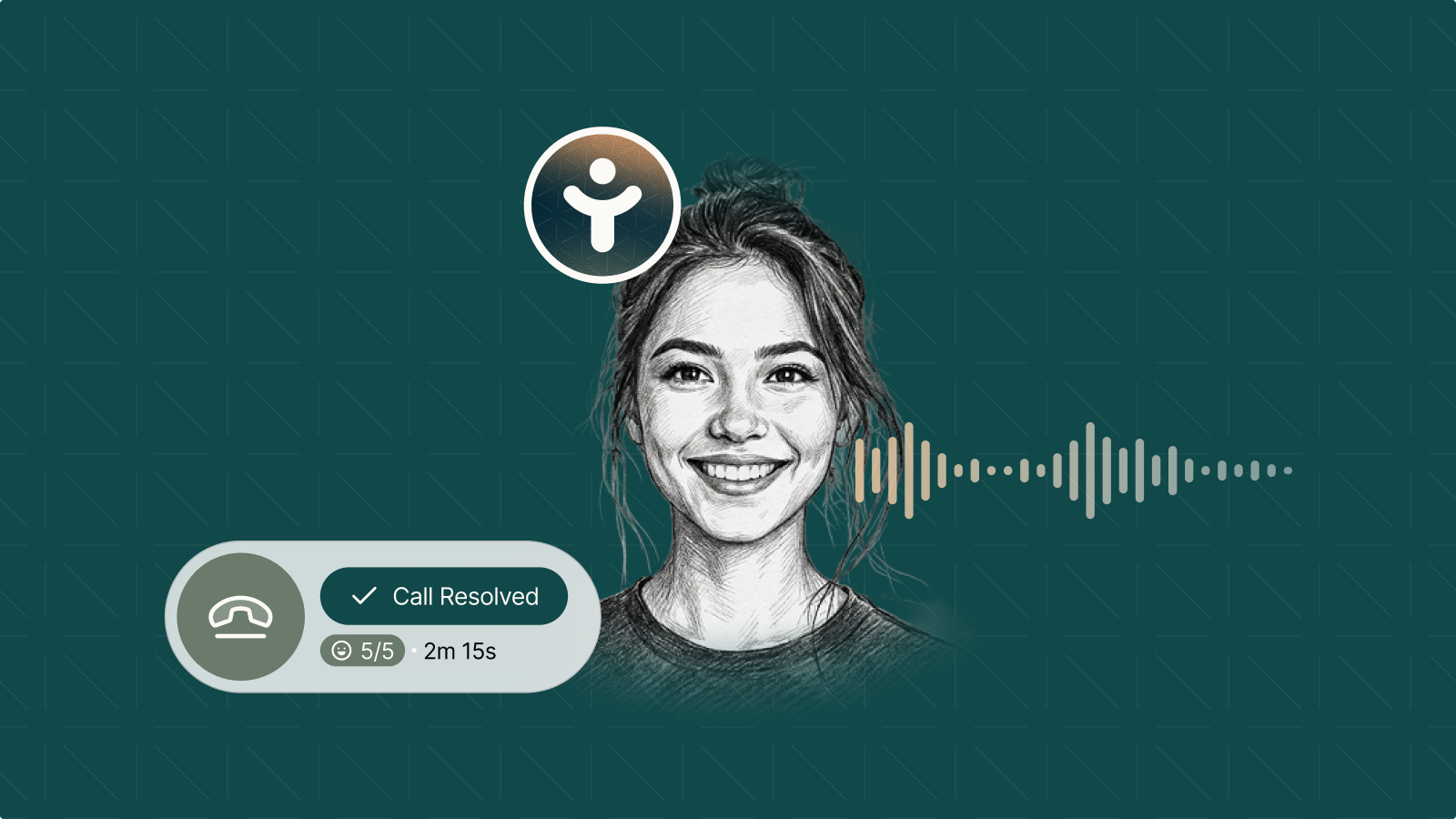
Toma's voice AI layer has been updated with three improvements that together make calls noticeably cleaner, more expressive, and better-timed.
Enhanced noise suppression
- Better background noise filtering on the customer's end so your AI Coworker can hear them clearly
- Fewer mishearings, fewer repeated requests, cleaner conversations from the first word
Agent emotions
- Toma now uses a voice model built with emotional expressiveness
- Agents can convey warmth and enthusiasm, with natural variation in tone, not a flat, monotone read
- The result: conversations that feel even more like talking to a person
90% fewer interruptions
- Improved end-of-turn detection means Toma waits for customers to finish before responding
- Fast to respond when the customer is done; patient with slower talkers
- Fixes long-pause and silence detection issues that previously triggered premature interruptions
Smarter Policy Search and Application
Policies can now be searched and found by name, application accuracy during live calls has improved, and discovery across the full policy list is faster.
- Search policies by name for faster access
- Improved application accuracy during live calls
- Faster discovery across the full policy list
Translation in Transcriptions
When a customer calls in a Toma-approved language, your team can now read the full conversation in English, directly in Inbox.
- Call transcripts now show English translations inline in the Inbox conversation view
- No configuration needed: works automatically for any Toma-approved language
Improved Transfer Awareness
AI Coworkers now have full visibility into transfer availability status and the reasons behind it, leading to more accurate and helpful responses during calls.
What changed
- Toma's AI Coworker now receives full context on why a transfer target is unavailable, including after-hours schedules, weekend closures, and other configured restrictions
- When a department can't take a transfer, the AI Coworker accurately explains the reason and offers appropriate next steps: a callback, a message, or a different department
- Eliminates a category of incorrect responses that occurred when the AI silently skipped unavailable transfer options
After-Hours Appointments in Dashboard
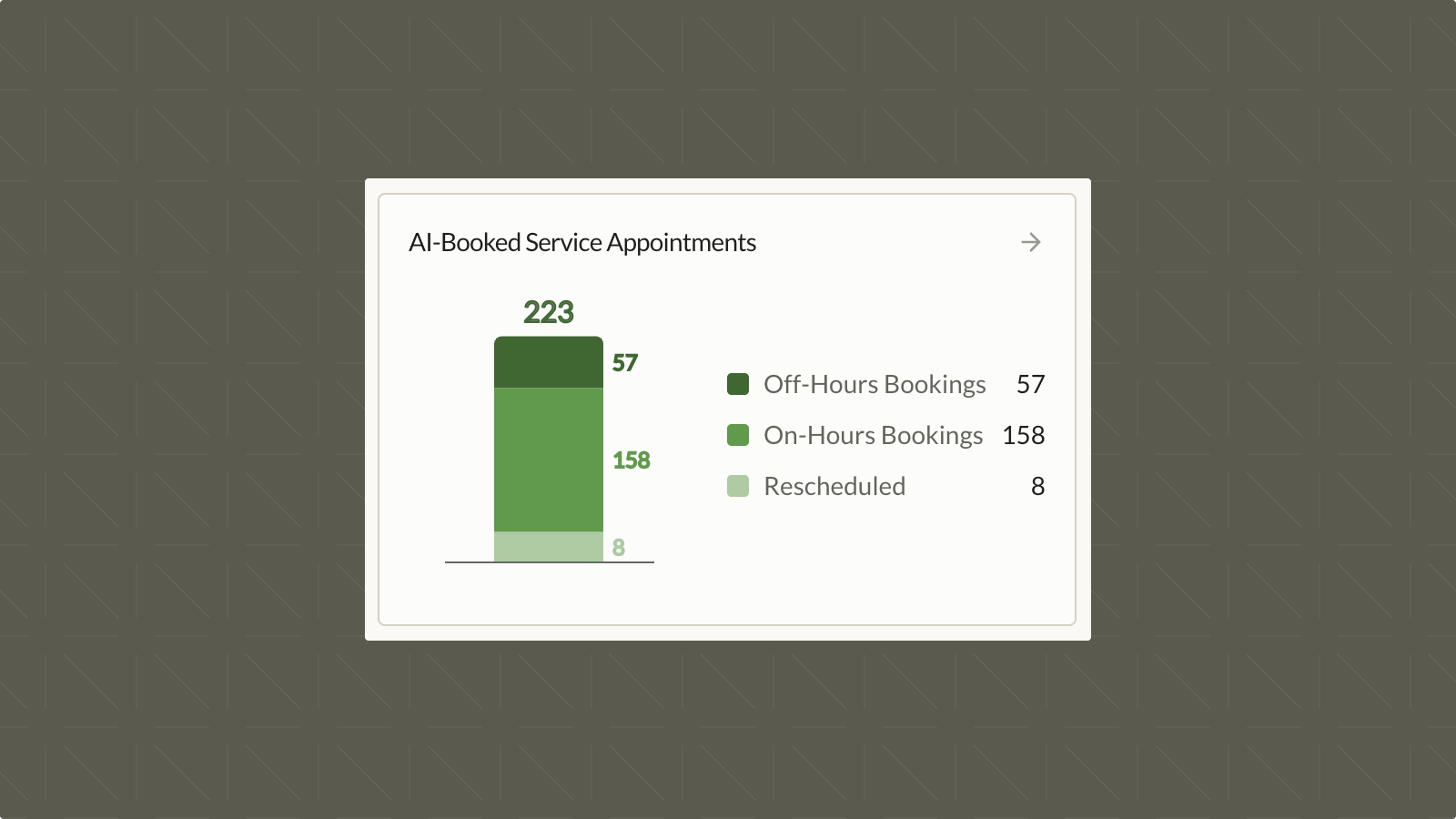
Most dealerships track total appointments. Fewer track when those appointments were booked. The after-hours count shows exactly how much volume Toma is capturing when your team isn't available.
What's new
- After-hours appointment count displayed in the Dashboard
- Broken out by weekends and weekday off-hours separately
- Shows the appointments that would have gone unbooked without Toma's 24/7 coverage
Advanced PII Redaction
Payment information and Social Security Numbers are now automatically redacted from call recordings and transcripts before they're stored. To enable this for your account, reach out to support@toma.com.
- Credit card numbers, CVVs, and payment information spoken on a call are replaced with a bleep or silence and a blur in the transcription
- Social Security Numbers shared during identity verification are redacted automatically
- Applies to all recordings and transcripts once enabled: no additional configuration needed
Dashboard V2 Redesign
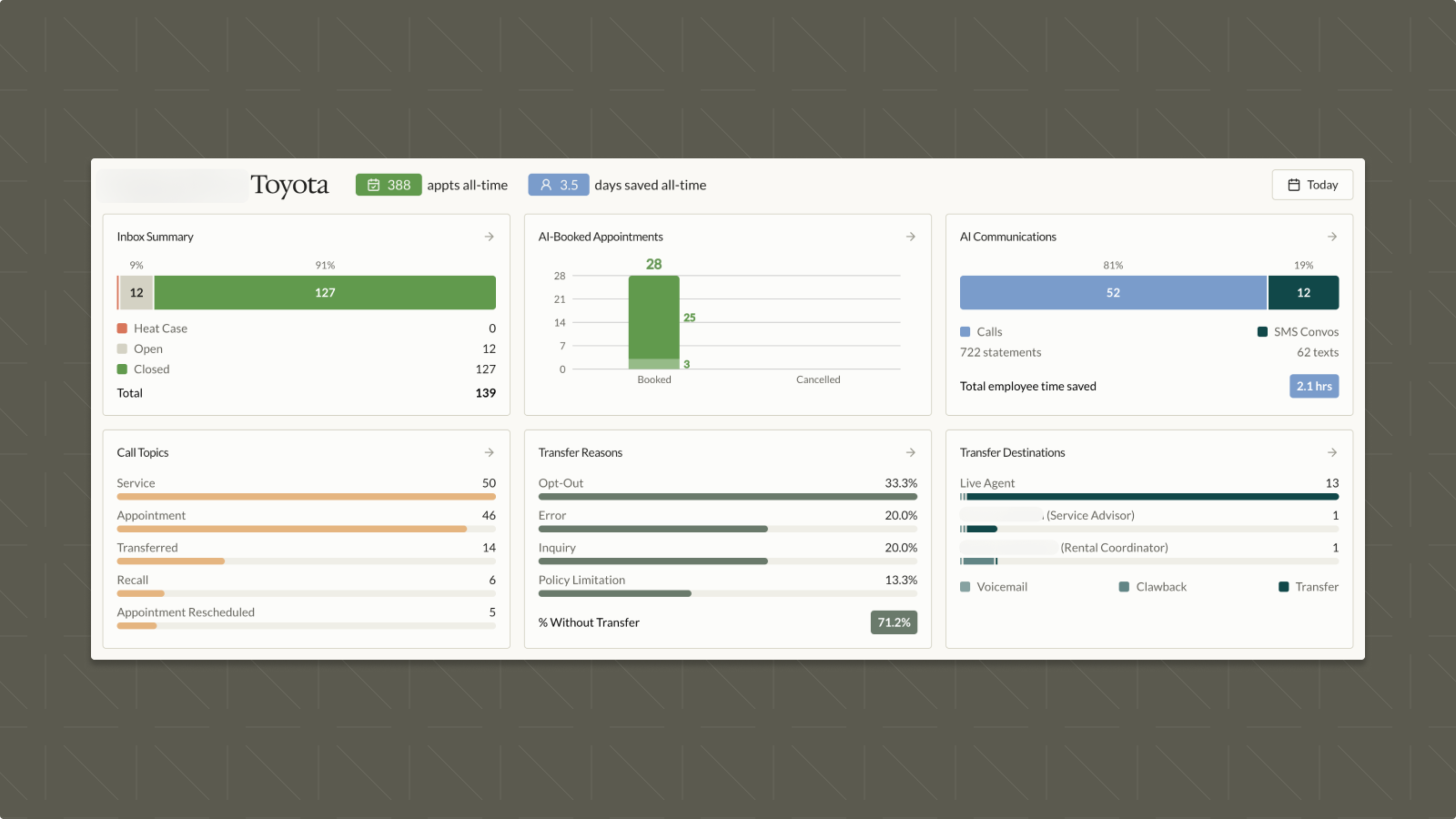
Dashboard V2 is now live for all users, accessible from the banner on Dashboard V1.
New Lifetime Metrics
- Lifetime appointment count and total employee days saved (calculated as 8-hour non-stop person days) are displayed as headline chips
New & Updated Cards
- 6 new and updated cards including an Inbox snapshot, transfer reasons breakdown, and transfer destinations breakdown
- Inbox preview now replaces the previous Interactions view
- Cards link directly out to their corresponding detailed reports
Performance
- Significantly more responsive queries, especially for larger time ranges
SMS Media Support for Outbound & Inbox
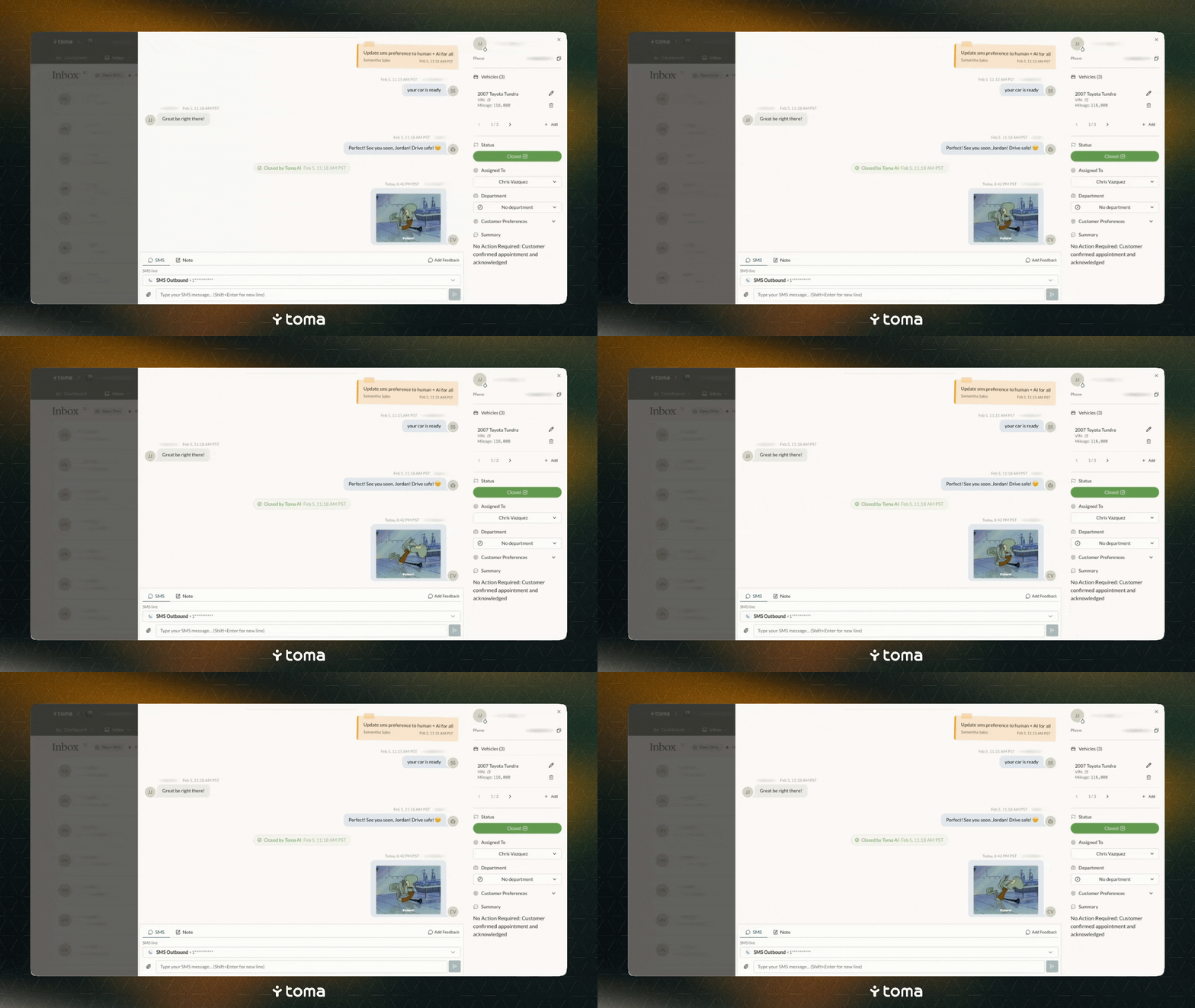
SMS media support is now live, enabling rich media messaging across both Outbound campaigns and the Inbox.
Outbound Campaigns
- Attach images, PDFs, and other media files directly to outbound SMS campaigns
- Supported formats include JPEG, PNG, GIF, HEIC, and PDF (max 25MB)
Inbox SMS Composer
- Drag and drop or attach media when replying to conversations via SMS
- Media attachments appear inline in the conversation thread
Introducing Channels & Transfer Targets
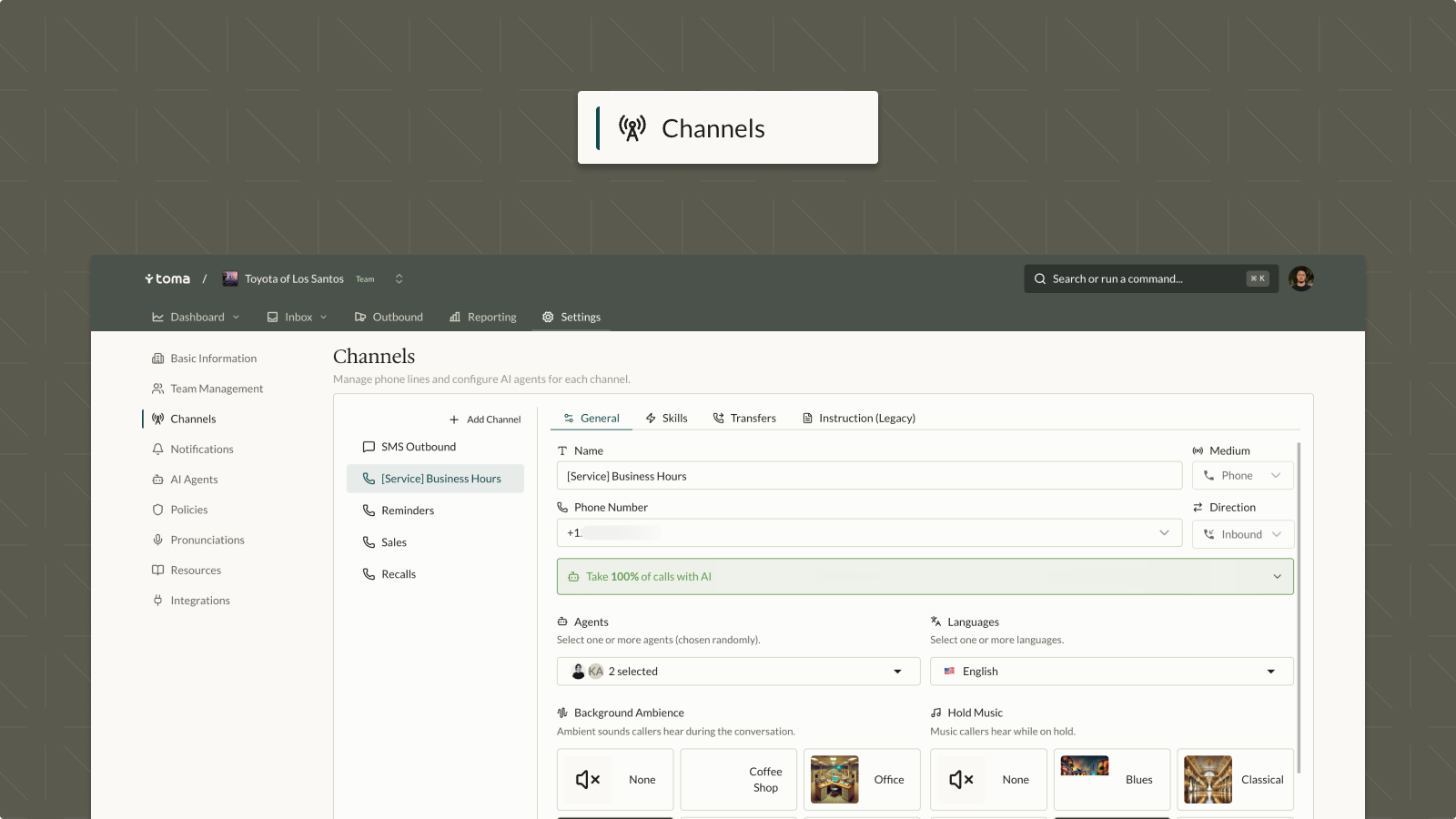
Lines are now called Channels.
All accounts have been automatically updated — no action needed on your end.
A Channel represents one specific communication path at your dealership, like inbound Voice or outbound SMS. The settings you're used to are all still there:
- On/off and coverage settings — control when and how each channel is active
- Agent or assistant configuration — set which AI Coworker handles this channel
- Phone number — the number tied to this channel
- Default language — configured per channel
Transfer Targets are a new way to define where calls can be transferred — including to people and numbers that aren't Toma users. Each target needs a label and a phone number, and can represent:
- An individual at the dealership (for example, a specific service advisor)
- A department or group (for example, Service, Parts, or Sales)
- An external destination (for example, a tow company or roadside assistance line)
Toma IQ v1.1: Higher Confidence & UI Updates

Toma IQ (Policies) v1.1 refines the policy review experience with improved accuracy and a cleaner interface.
Policy Generation
- Higher confidence threshold reduces noise by surfacing only high-quality learned policies
- Slower generation cycle gives operators more time to review without being overwhelmed by new entries
UI Updates
- Simplified views for easier policy management
Robust In-App Global Search
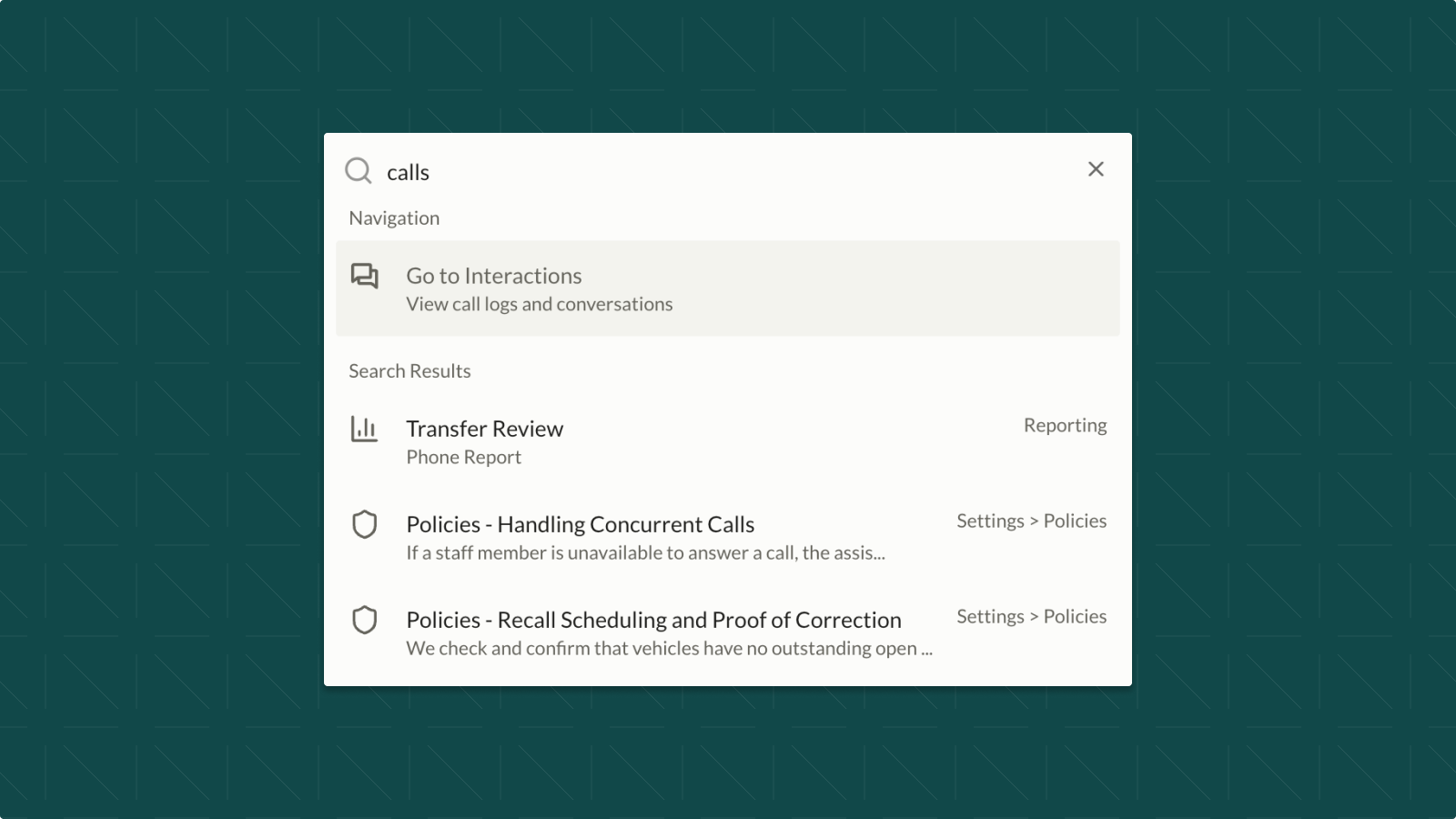
Global search across the Toma platform has been significantly upgraded for faster, more relevant results.
Search Improvements
- Results are now prioritized by page context — searching from Settings will surface Settings-related results first
- Search results link directly to Inbox views for quick access to conversations
- Partial matches are included alongside top results in a single unified list
- Accessible from anywhere in the Toma app via the top navigation search bar
Outbound v1.1: Trigger-Based Campaigns
.png)
Outbound v1.1 introduces trigger-based campaigns!
Automated SMS messages fired by real-time events, with simple on/off toggles.
Trigger-Based Campaigns
- Appointment Confirmation: Immediate SMS after a booking is made
- Appointment Reminders: Automated SMS sent 24, 48, and/or 72 hours before a scheduled appointment
Bug Fixes & Hardening
- Added support for contact groups in campaign targeting
- Fixed SMS number handling for more reliable delivery
Outbound: Continuous Campaigns via Email Feed
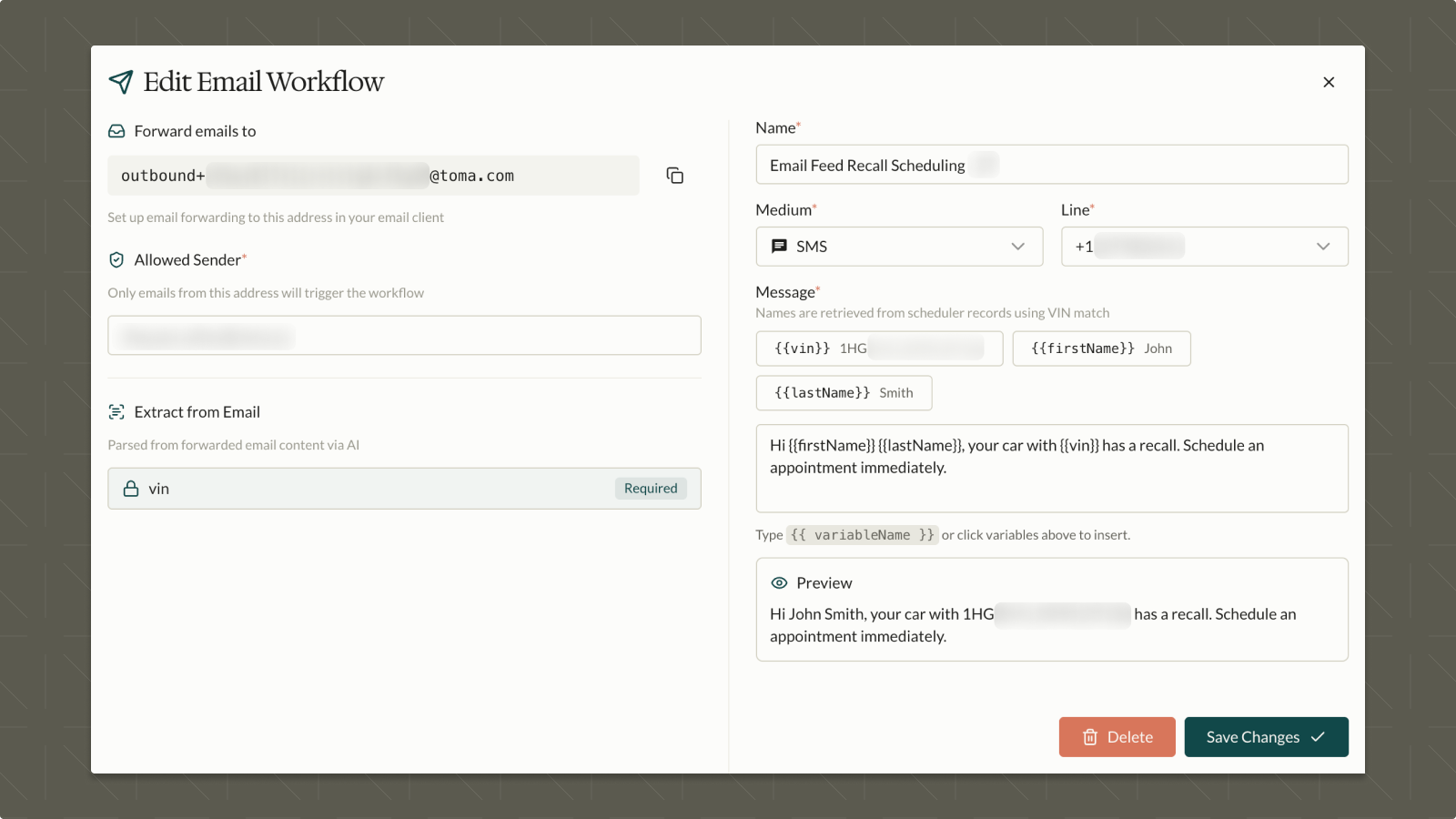
A new email feed trigger enables continuous outbound campaigns powered by forwarded emails — perfect for recall notices, overdue service reminders, and other bulk outreach.
How It Works
- Set up email forwarding to a dedicated Toma address for your bulk campaign source
- The feed automatically scrapes VIN data from forwarded emails
- Customer matching is performed via DMS lookup for accurate targeting
Dynamic Message Variables
- Messages support VIN, first name, and last name variables
- Example: "Hi {first name}, your vehicle with VIN {vin} has an open recall. Please call or text us to book a complimentary service."
Compliance: Phone & SMS Opt-Out Tracking
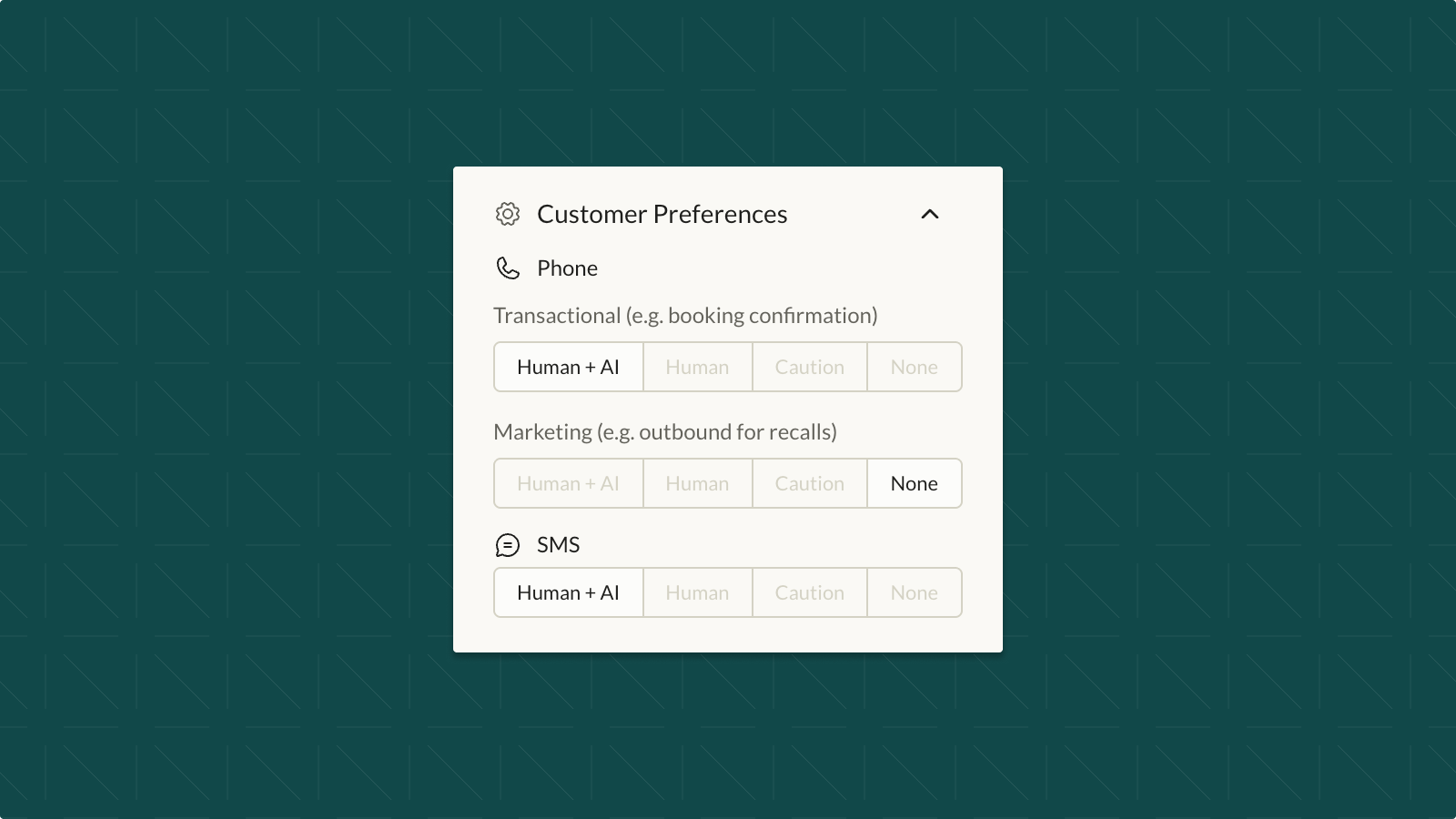
Full phone and SMS compliance tracking is now live for both marketing and transactional communications.
Opt-Out Mechanisms
- Customers can press "9" during a phone call to opt out
- Customers can text "Stop" (or similar keywords) via SMS to opt out, with Toma confirming the request
Compliance Status Tracking
The following statuses will be shown and can be manually configured within an Inbox ticket:
- Human+AI: Full AI and human communication enabled
- Human only: Only human agents can communicate
- Caution: Functionally human-only (internal UI status for monitoring)
- None: Customer has fully opted out
Enforcement
- Outbound campaigns and "Enable AI SMS" are automatically blocked based on the customer's compliance settings
Inbox v1.7: Bug Fixes & Usability Updates
Inbox v1.7 delivers a wide range of bug fixes and usability improvements.
Key Fixes
- Fixed unintentional "Open" status when a conversation is unassigned
- New admin setting: "If successful transfer, mark as closed"
Usability Improvements
- Clearer transcript and feedback UI throughout conversation view
- Vehicle and customer fields are now editable inline
- Improved vehicle matching with multi-vehicle support
- Multi-line SMS input now supported with Shift+Enter
- New filter option: filter conversations by last message modality
Notifications V2: Admin & User Settings
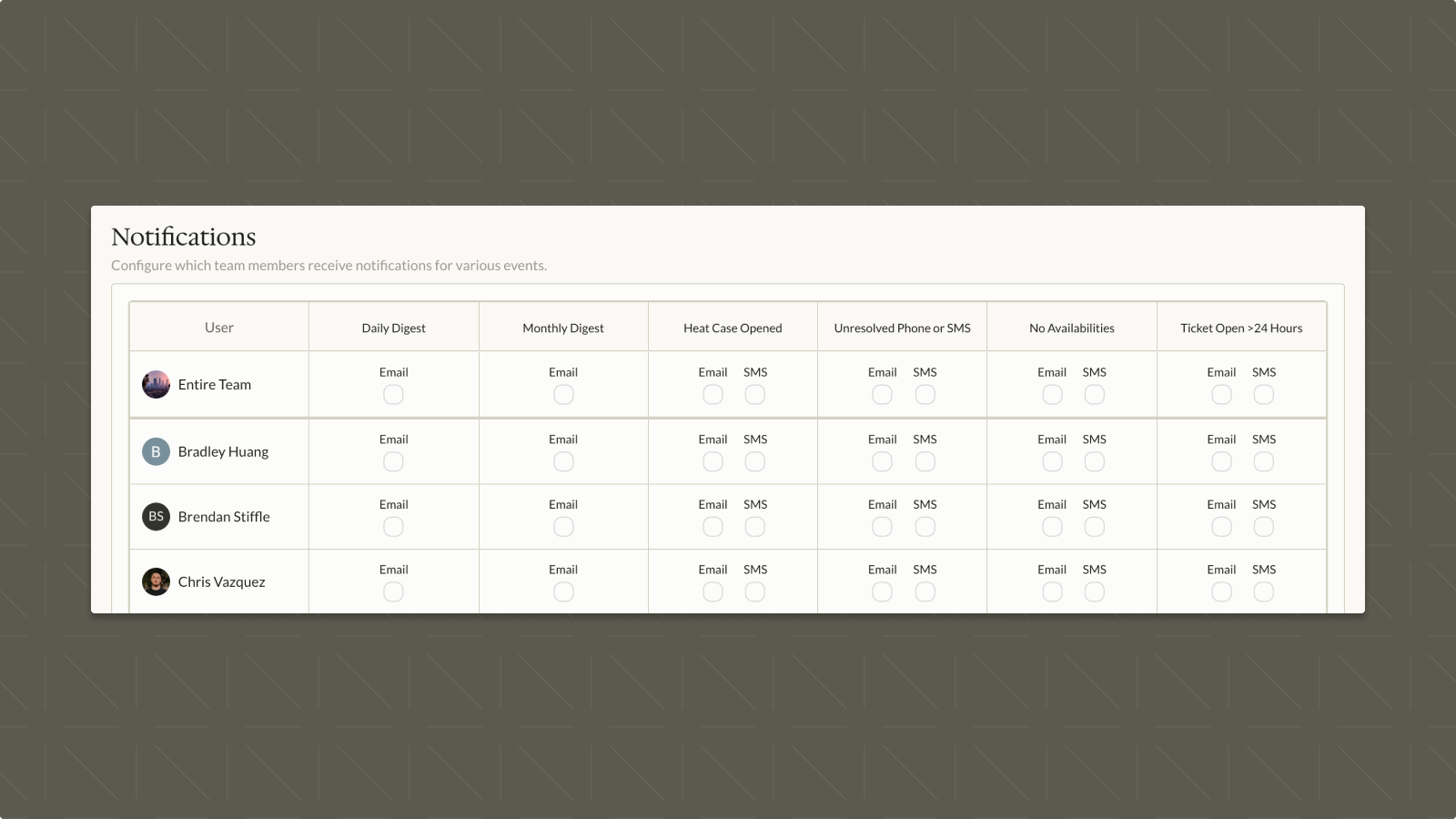
Notifications V2 introduces self-serve notification preferences for users and expanded admin controls for managing team notifications.
User-Level Controls
- Users can now manage their own notification preferences from their Account settings
- Supports per-team notification configuration for users on multiple teams
Notification Types
- Daily Digest: Summary of daily activity
- Monthly Digest: Monthly performance overview
- Heat Case Opened: Triggered when a heat case is opened (assigned or unassigned)
- Unresolved Phone or SMS: Alerts for unresolved phone calls and SMS conversations
- No Availabilities: Notifies when no appointment availability is found
Admin Controls (Team Level)
- Consolidated admin view to configure notifications for all team members from a dedicated "Notifications" tab in team settings
- Per-user toggles for each notification type
Scheduler Integration Fixes
Resolved bugs across three scheduler integration providers to improve appointment booking accuracy.
- Reynolds: Fixed incorrect service matching
- DealerFX: Fixed base model matching error
- PBS: Fixed VIN decode failures
General Bug Fixes: Inbox, SMS & Call Handling
A batch of bug fixes improving reliability across Inbox, SMS, and call handling.
- Fixed team member invitations not sending when added via team settings
- Fixed Inbox not updating to show recent calls
- Fixed pre-call actions failing due to a database persistence error
- Fixed SMS send failures caused by an empty string bug
- Removed automatic transfers that were incorrectly triggering at 40 seconds of silence
Branding Update & Top Navigation Bar
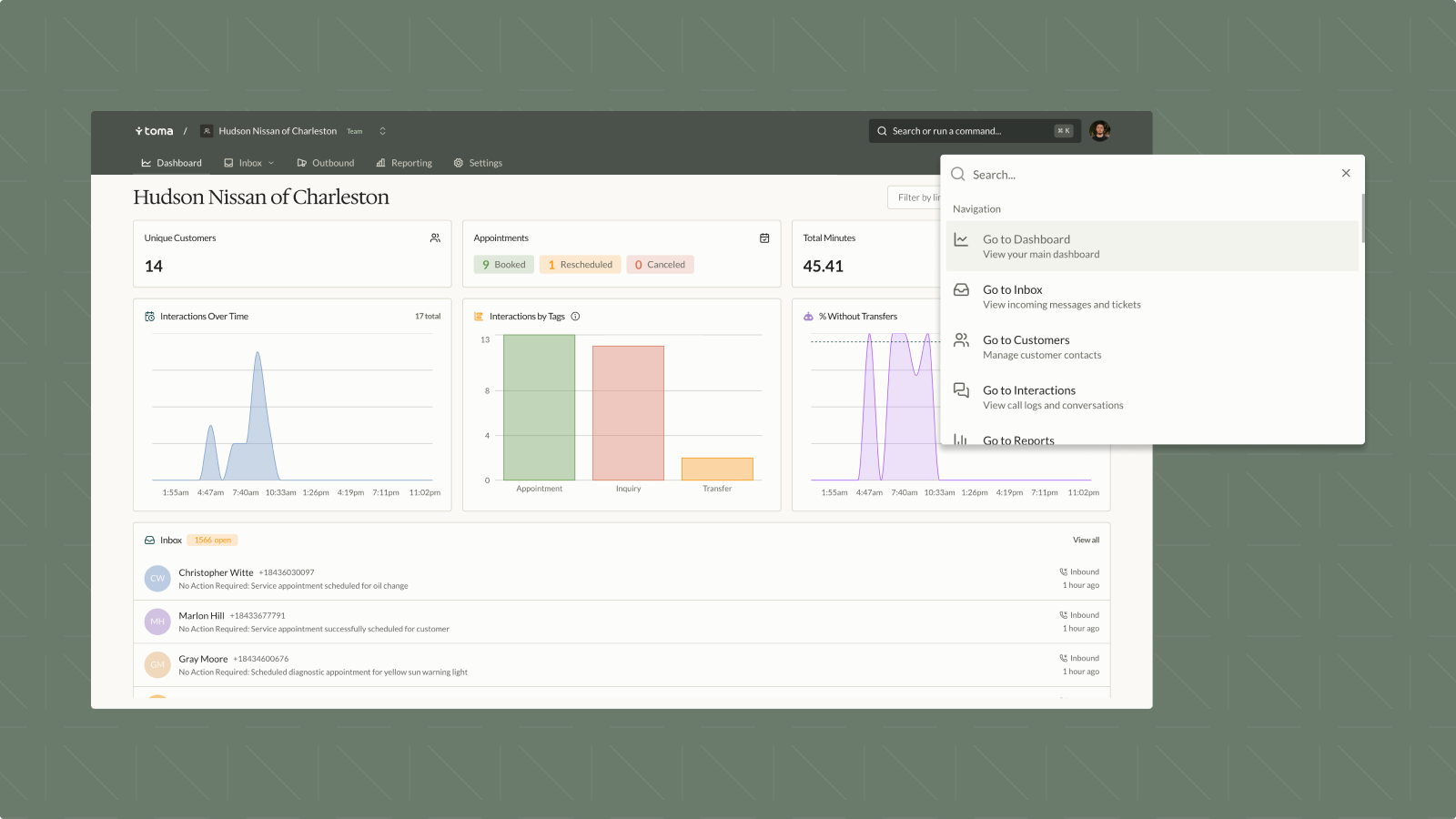
A full branding refresh across the entire application, paired with a redesigned top navigation bar.
Branding Updates
- Updated colors, icons, and typography to align with the new Toma brand identity
- Consistent visual language across all pages and components
New Top Navigation Bar
- Re-arranged dropdown menus for faster access to key pages
- "Interactions" is now nested within "Inbox" for Inbox customers — non-Inbox customers will see "Interactions" in its place
- New search bar included — currently a basic navigator, with future support for page-specific searching (customer, VIN, policy, etc.)
Lines Page Moved to Settings
The "Lines" page has been moved to a new tab under Settings as part of ongoing navigation improvements.
- Lines is now accessible as a tab within the Settings section
- This is an intermediary step — further improvements to the Lines tab are planned for upcoming releases
Inbox v1.6: Interactions Parity & Bug Fixes
Inbox v1.6 brings Interactions parity and several bug fixes to improve the conversation experience.
Interactions Parity
- "Submit feedback" is now available per call in conversation timeline
- Actions are now shown inline within the transcript
- Transfers are now visible in conversation timeline
Bug Fixes
- Fixed refetch issues for more reliable data loading
- Fixed filter multi-select behavior
- Minor UI refinements throughout the Inbox
Outbound Beta Launch
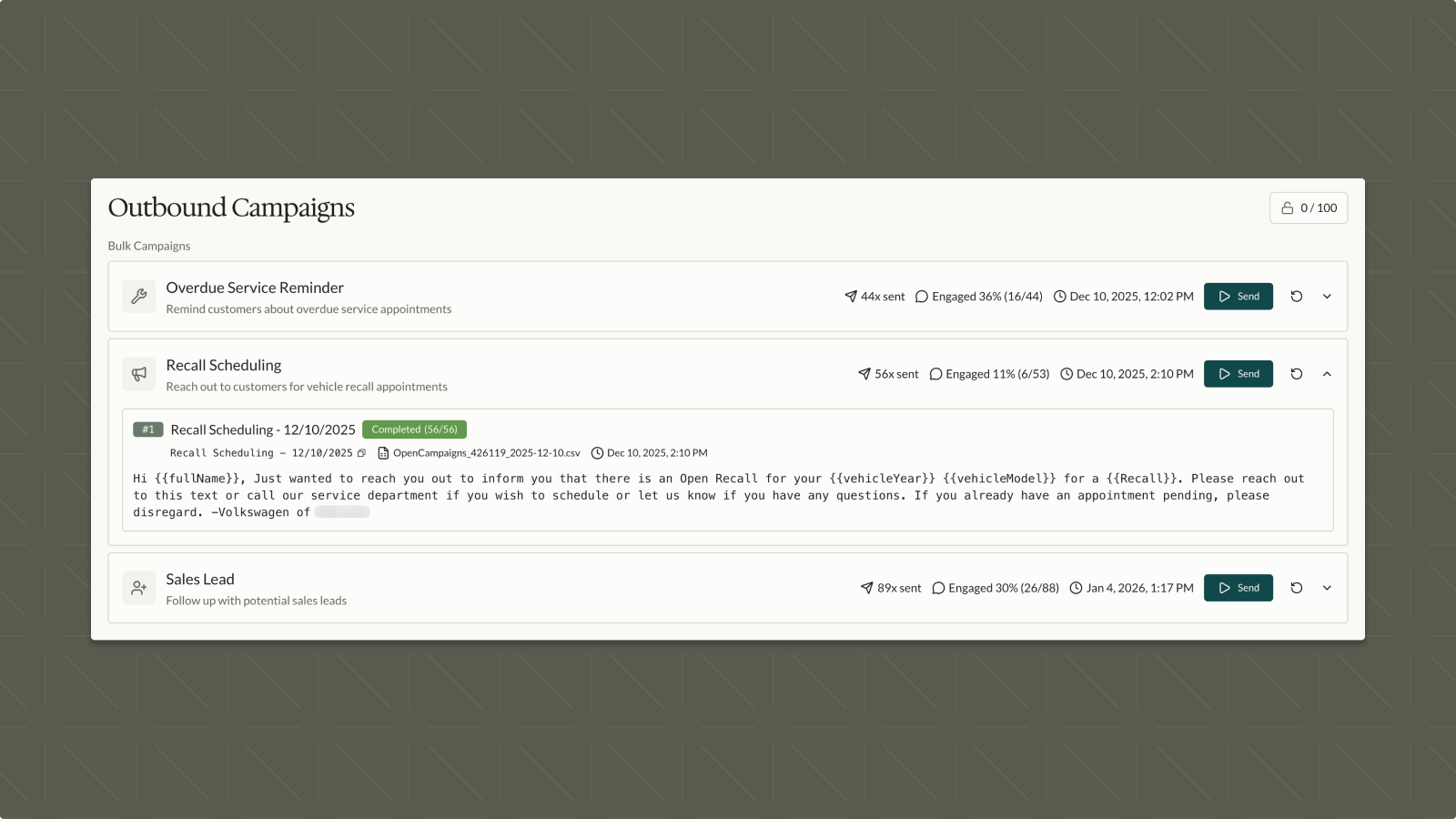
Outbound has launched in beta, available to Trusted Testers behind a feature flag.
Initial Capabilities
- Upload a CSV of customer contacts to create outbound campaigns
- Send SMS outbound messages to up to 100 recipients per day
- Enables dealerships to proactively reach customers via text for service reminders, follow-ups, and more
Voice Latency Fix
Resolved a voice response latency issue that was causing slow AI responses during live calls. Bringing average response time back in line with industry leading ~2 ms response times.
- Root cause identified as a speech-to-text processing delay
- Fix improves real-time call responsiveness across all customer accounts
Inbox v1.4: Auto-Assign & Usability Improvements
Inbox v1.4 introduces smarter Auto-Assign routing and several usability enhancements to the conversation experience.
Auto-Assign Improvements
- Conversations are now assigned to the user first (and their associated department), falling back to department only, then to general if uncertain
- Department tied to a user is automatically updated when a user is manually assigned
Conversation View Updates
- Added date timestamps to all conversation view entries
- AI open/close history is now visible in conversation view (previously only showed manual changes)
- Any last interaction with a left voicemail now forces "Open" / Action Required status
- Increased "Open" ticket threshold, particularly when a live human is requested
- Improved voicemail playback UI in conversation view
User Invitation Fix
Fixed a bug that prevented new team members from receiving their invitation emails when added through team settings.
- New user invitations were silently failing when added via the team settings page
- Invitations are now sent reliably, allowing new users to access their accounts immediately